
Capterra is a software marketplace where users can rate and review the software and applications they use. Potential buyers can compare products, features, and user reviews to decide which technology to invest in. Because of this, this network is crucial for companies choosing software, and many providers compete to get better reviews and overall rankings. Capterra’s reviews rank well on search engines like Google and can be visible when people are searching for your company or competitor’s name.
Capterra is part of a network of tech review websites, including Peer Insights, Software Advice, and GetApp. All the networks share reviews with each other, therefore it is beneficial to have reviews there, and maintaining one of them automatically improves your standing across all of them. Therefore, this post covers how to manage reviews not only on Capterra but also across all Gartner networks, including Peer Insights, Software Advice, and GetApp.
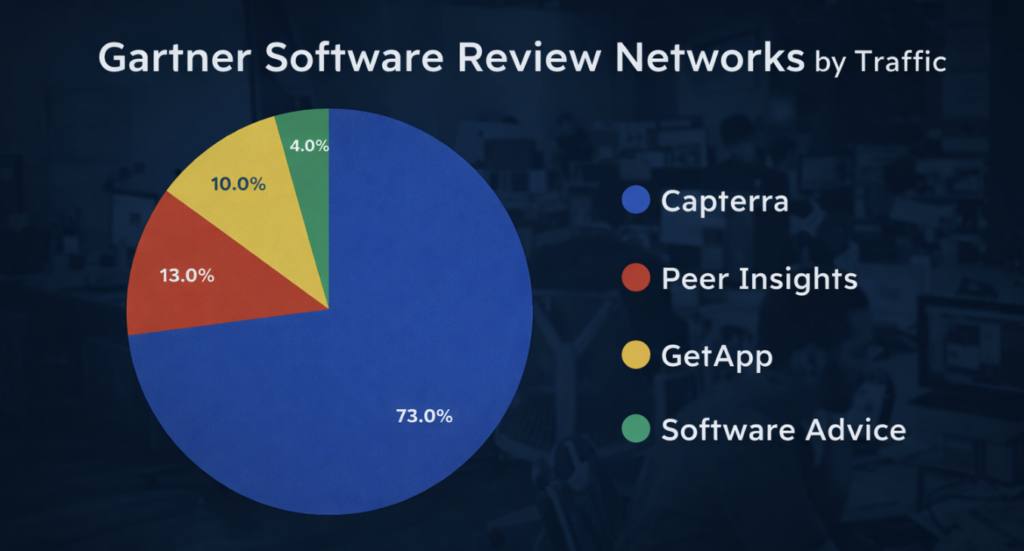
Software Review Networks Under Gartner Ownership by Popularity
Gartner owns four networks for software product and technology reviews, each with strong authority in tech communities and serving as “go-to” sources for researching and choosing tech products. According to our calculations, Capterra is the most popular, receiving 73% of all traffic to Gartner’s tech networks. Peer Insights follows with 13% of the traffic, GetApp receives 10%, and Software Advice accounts for the remaining 4%.
Who Can Leave Reviews on Capterra
Unlike other online review platforms, Capterra takes serious steps to verify each review and allows only verified members to write those reviews.
- Verification Process. Capterra investigates each reviewer, checking their company, job title, and company email. Reviews from public email addresses (Gmail, Yahoo, Aol etc) are not accepted, and if a reviewer’s identity cannot be verified, the review won’t be approved.
- Real Customers and Users Only. The reviewer must be a real customer using the software or tech product in their job. The review must be written in details. No short 5 star reviews like “Love it! Great customer service.”
- No Conflict of Interest. Reviews won’t be approved if there is a potential conflict of interest.
- For example, Capterra moderators have disapproved reviews from people who work in financial institutions, venture capital, private equity, advertising, or consulting companies because they might have a stake in the company or other personal interests.
These strict measures make it difficult for anonymous users, disgruntled employees, competitors, trolls, or people working for the same company to post reviews and/or manipulate ratings.
Can Companies Remove Fake Capterra Reviews?
Even with Capterra’s strict controls, some fraudulent or unjust reviews can still slip through its systems and moderation and end up being published. That’s why the network has easy to use system in place where companies can email them to flag the review for investigation. With a free-form email system in place, the person who is flagging the review can provide a full explanation of why they believe the review violates Capterra’s rules and should be removed.
Unlike other networks, there is no link to flag or form to submit a questionable review. Instead, an email from the company that owns the tech product will initiate the investigation process by moderators if the review violates community guidelines.

How to Remove Suspicious Capterra Reviews (Step by Step)
To report a suspicious review, email Capterra at reviews@capterra.com. You should provide as much details as possible about the review in question and explain why you believe it should be investigated and removed.
Reporting Reviews on Other Gartner Networks
Gartner shares all reviews across all their networks, so you can report a review on any of them. If a review is reported and removed from Capterra, it will also be removed from Peer Insights, GetApp, and Software Advice.
To report a review on other networks, you can use the same email option for reporting.
Reporting Reviews on Peer Insights:
To report a questionable review to Gartner Peer Insights, email the moderators at PeerInsights@gartner.com with detailed information explaining why you believe the review should be removed.
Reporting Reviews on Software Advice:
To report a negative review on Software Advice, email reviews@softwareadvice.com with detailed information about the review and your reasons for requesting an investigation.
Reporting Reviews on GetApp:
To report a review on GetApp, email the moderators at reviews@getapp.com with detailed information about the review and your reasons for requesting an investigation.
Reporting Suspicious Reviews for Capterra Sponsors
If you’re a Capterra sponsor, you can also report the review by logging to your Capterra vendor portal.
It doesn’t matter which network you use to initiate the investigation, Capterra, Peer Insights, Get App, or Software Advice. It will be handled by the same Gartner moderator’s team. It won’t affect or change the timeline and chances of removal.
How to Report Negative Reviews to Capterra as a Sponsor. Step-by-Step:
If you have a sponsored pay-per-click (PPC) account with Capterra, you also get access to a dashboard where you can monitor and manage your reviews. If you spot anything suspicious, you can flag and report it directly from there:
- Log in to your Capterra account
- Navigate to reviews
- Identify the negative review in question
- Click on the review in question
- Click the “Report” option
- Select the reason for reporting
- A pop-up will appear asking you to provide the reason for reporting the review. Select the most appropriate option.
- Provide additional information
- If asked, provide more details and evidence.
- Submit the report
- Monitor the status
- Follow up if necessary by emailing capterra (see the previous steps and email)
To increase your chances for successful removal, you should familiarize yourself with the Capterra’s community guidelines.
Whether your company is a paid vendor/sponsor or a non-paid user, everyone has an equal chance of getting the review reviewed and removed. Capterra treats everyone fairly to uphold the integrity of review rankings.
Which Capterra Reviews Can Be Reported and Removed?
While Capterra has strict review approval policy, occasionally, some reviews that don’t meet these rules and guidelines may still slip through. Therefore, here’s what to consider when reporting a review:
- Reviews must be from real verified individuals who use the product.
- Conflict of Interest. Reviews should not come from employees, or people with a stake in the company, or vendors, contractors.
- Reviews must be posted by the actual reviewer who use the software, not under a fake name or on behalf of another person or company.
- Original reviews only, must not be copied from other networks and sources.
- Respectful Content. Reviews can’t contain abusive, hateful, threatening, or harassing language.
- Reviews should not include personal or easy identifiable information about employees, contractors, or vendors.
- Legal Compliance, where reviews can not violate legal, contractual, or confidential agreements.
- Reviews cannot accuse companies of illegal activities. Such claims, if true, should be reported to the appropriate authorities.
- Capterra will not publish reviews that could violate the law.
Can Companies Flag and Remove Incentivized Reviews That Violate Capterra’s Guidelines?
It is true that Capterra and Gartner Peer Insights runs incentive campaigns to encourage more reviews from real software and tech product users, offering gift cards. However, occasionally this can lead to people who’ve never used your product writing reviews just for the rewards. Consequently, those reviews can accidentally slip through the network’s moderation process and get approved. Even if they give you 5 stars, their review might not accurately represent your product and features, which could confuse potential real customers. Therefore, if you suspect a review is misleading because the person doesn’t really know your product, it’s important to report it.
Are Reviewers Notified If Their Capterra Review Is Reported?
Yes, during the investigation, Capterra may reach out to the person who wrote the product review. They’ll ask questions to clarify, provide proof, and gather additional information. This helps ensure that the review is genuine, fair, and accurate, and it gives the reviewer a chance to explain their perspective more thoroughly.
There is always a risk that if a negative software review is successfully removed by Capterra, the customer might respond by writing another review. This time, they may be more careful with their wording and provide more detailed information to ensure the new review adheres to the platform’s guidelines and cannot be easily challenged or removed. This can make managing and addressing such reviews even more challenging for tech companies, as the customer might be more determined to have their feedback remain visible.
How Long Does It Take for Capterra Moderators to Review a Report?
When you report a review to Capterra, your case is typically handled by a real person who reviews it, investigates the issue, and keeps you updated on the status. You get an actual email reply from the representative. The process is usually quick, with clear communication and follow-up on the outcome.
Capterra Reviews Shared Across Other Gartner Networks
When customers leave a review on Capterra, it doesn’t just stay there. That reviews are shared across other Gartner networks, including Peer Insights, Software Advice, and GetApp. This means, the feedback and ratings reaches a wider audience and ranks better on search engines.
If a review is successfully appealed and removed from one network, it will be removed from all four. This update ensures your star ratings are consistent across all four platforms. Because of connected system, it’s a great to encourage satisfied users to leave reviews and report negative ones.
In addition, business directories and aggregator sites often quote and list Capterra results, reviews, and ratings.
Managing Your Gartner Business Profiles
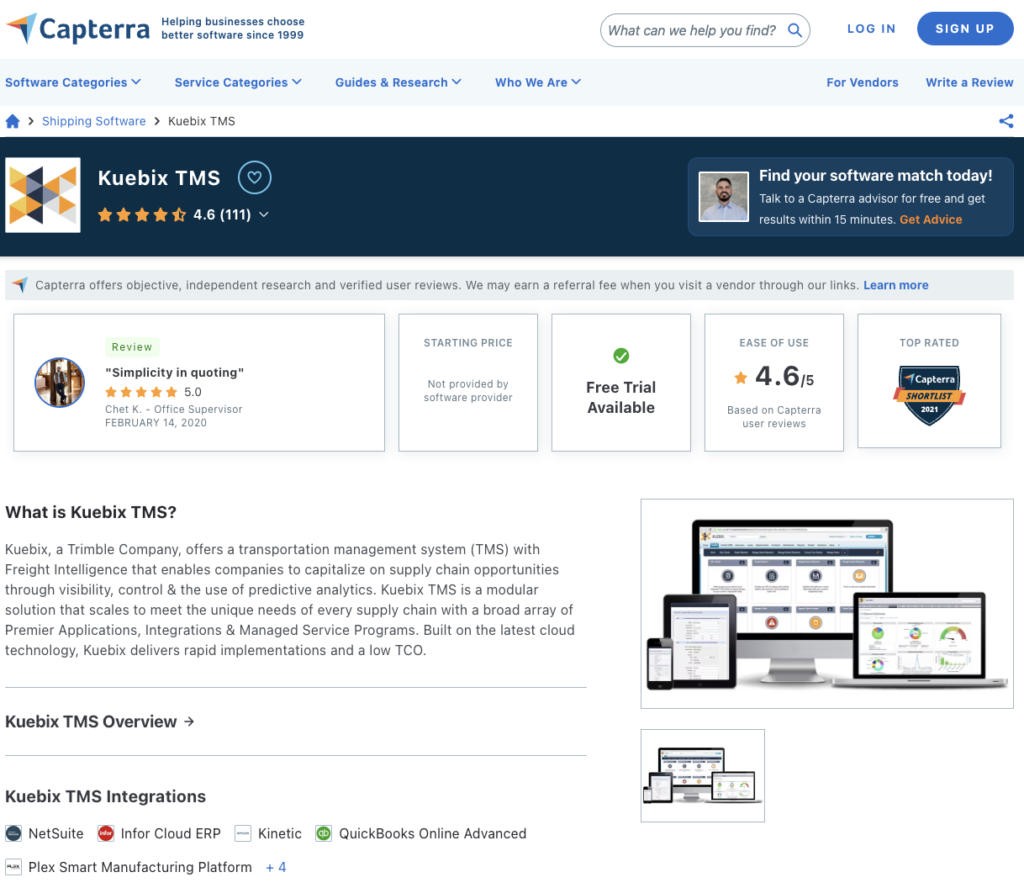
Submitting or claiming your software product and managing it on Gartner networks like Capterra, Peer Insights, GetApp, or Software Advice can be even more important than managing your reviews. These platforms allow you to present your products, functionalities, and advantages. Unlike other business and review networks where you submit basic information like company name, logo, photos, address, or description, all four Gartner networks can serve as a “mini website” for your software. They provide full description of your tech product, including screenshots, videos, features, functionalities, pricing, pros and cons, customer reviews, and many more. Managing your Capterra and other Gartner profiles can be critical for marketing and demand generation and winning customers from competitors.
Capterra Reviews Rank High on Search Engines
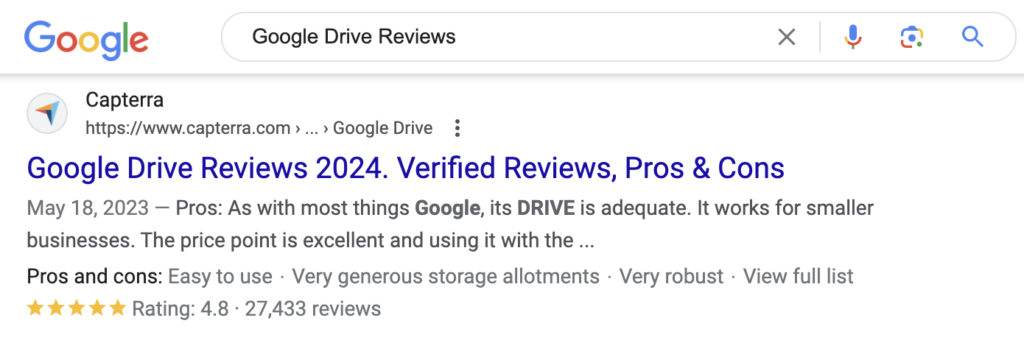
In addition to be shared across sister sites owned by Gartner, Capterra reviews rank high on search engines like Google and Bing, where star rating and review count appear as a snippet in search results. Therefore, having strong Capterra reviews makes it important not only for reputation management but for search engine optimization (SEO) as well.
Capterra Ranks High on Generative AI Platforms
AI platforms like ChatGPT, DeepSeek, Google Gemini, Bing’s Copilot analyze user generated reviews on Capterra to determine software functionality and feedback from users. Those reviews often appear in GenAI searches and recommendations, therefore it is important to use Capterra reviews for GenAI optimization.
For example, ChatGPT algorithms prioritize tech providers with most reviews on Capterra and other software review networks.
Can a Company Respond to a Bad or Negative Review on Capterra?
Yes, Capterra encourages tech vendors to respond constructively and respectfully to all reviews left on their profile pages.
Responding to a bad or negative review is a great way to show your customers that you care about your product. It is an opportunity to express gratitude for their input, positive or negative review, and reassure them that you’re taking steps to improve their experience and your software product. It demonstrates that you are proactive in resolving issues, show appreciation, and committed to providing excellent customer service. Fast response can turn even negative review into positive outcome.
Can Companies Remove Reviews About Outdated Features on Capterra?
Unfortunately, a review cannot be taken down because it mentions features that are no longer supported. If the review was accurate when it was first posted, it remains on Capterra and other Gartner networks including Peer Insights, GetApp, and Software Advice.
It can be frustrating, especially if an outdated feature affected your ratings negatively. The best way is to get new better reviews from the current customers. Also, the most effective way to handle old and outdated reviews is to respond and clarify that your software has evolved, and the feature in question has been removed or improved.
Can Companies Remove Themselves or Their Software Product from Capterra?
If you want to remove your company from Capterra and all other Gartner Networks, you can reach to their support team. You can do this by visiting their website and clicking on the “Contact Us” link. When you get in touch, just let them know you’d like to delete your company or software listing and give them any necessary details. But it doesn’t guarantee Capterra will remove your company or software product, they review and make a decision on case by case basis.
If your company is acquired or merged with another company, Gartner will investigate and decide case-by-case whether to create a new page, keep both pages but update the company name(s), or merge the two pages into one. It’s also up to Gartner how to handle reviews, and if they should be merged, removed, or kept as is.
If the company is out of business and the product is no longer supported, the listing most likely will be removed.
What Is the Success Rate of Removing a Negative Capterra Review
Removing negative Capterra reviews doesn’t have a guaranteed success rate. Each flag and report undergoes a thorough investigation by the Capterra’s moderators on a case-by-case basis. Capterra maintains neutrality in decision making by engaging with all parties involved and decides based on presented facts and how it stand against their rules and community guidelines. Gartner is one of the few companies that contact the person who wrote the review during the investigation process and listen to the both sides of the story. This approach highlights how seriously each review and report is handled, ensuring the review process maintains its integrity.
The Importance of Managing and Engaging with Capterra Reviews

Managing and responding to Capterra reviews is crucial for software companies because it directly impacts their reputation and influences how potential software and app buyers perceive their technology. Therefore, positive reviews build trust and credibility of the product, helping to attract new clients who rely on industry and peer feedback. By engaging with reviews, positive and negative, software companies show how they care about their customers’ experiences and are committed to improvements. Addressing concerns promptly not only resolves issues for current users but also improves their product and service.
How to Generate Positive Capterra Reviews to Offset Future Negative Feedback
Unlike other networks, Capterra actually encourages companies to facilitate reviews from their customers. To support this, on occasions they run promotions offering incentives like gift cards and perks for people who take time to share reviews on Capterra, Peer Insights, Software Advice, or GetApp.
Sponsored Services Capterra Provides
Capterra offers various sponsorship options to help companies get more web traffic, leads, reviews, and visibility to their tech product. However, becoming a Capterra sponsor won’t help you with negative reviews, as Capterra does not remove reviews for paid customers.
- Pay-Per-Click Advertising. Capterra has it’s own PPC model where companies can pay to rank higher in their software category and search results. Companies that sign up for Capterra’s PPC services can also add a direct link to their website and enhance their profile. Free listings don’t provide link back and rank below the sponsored results.
- Paid Review Facilitation. Capterra helps companies gather reviews by contacting their customers and asking them to write reviews on the company’s behalf.
As mentioned before, the network cares about review integrity and even with these advertising options, sponsors cannot control, delete, bury, or hide bad or unjust reviews. Capterra does not remove negative reviews, even for paid customers unless reviews violate the guidelines.
It’s Not About Deleting Everything, It’s About Managing What Stays
At the end of the day, Capterra isn’t a place you “clean up” once and forget. It’s something you manage over time. Some reviews will stay, even if they’re outdated or frustrating, and that’s part of the game. What actually makes a difference is how you respond, how you report what clearly breaks the rules, and how consistently you bring in real, positive feedback. If you look at the most successful companies on Capterra, you’ll see that they treat it like an ongoing process instead of a one time fix.