
You can’t directly delete Google reviews, but you can request removal of reviews that violate Google’s policies (like spam, fake, or harassment) through your Google Business Profile. Let’s go over it in detail.
Google Business Profile and Maps is the most visible review platform. Anyone who searches your business name, even just to get directions or find your phone number, sees your reviews immediately. And sometimes, they are not the best ones. It is even worse if your rating is 4 stars or lower. People form an opinion about your business before they have called, clicked your website, or even arrived at your location.
How to Deal With Bad Google Reviews
Receiving a bad review on Google is never easy and always hurts, whether it’s from a customer, client or an employee. Even worse when it is a fake review from a spammer or competitor.
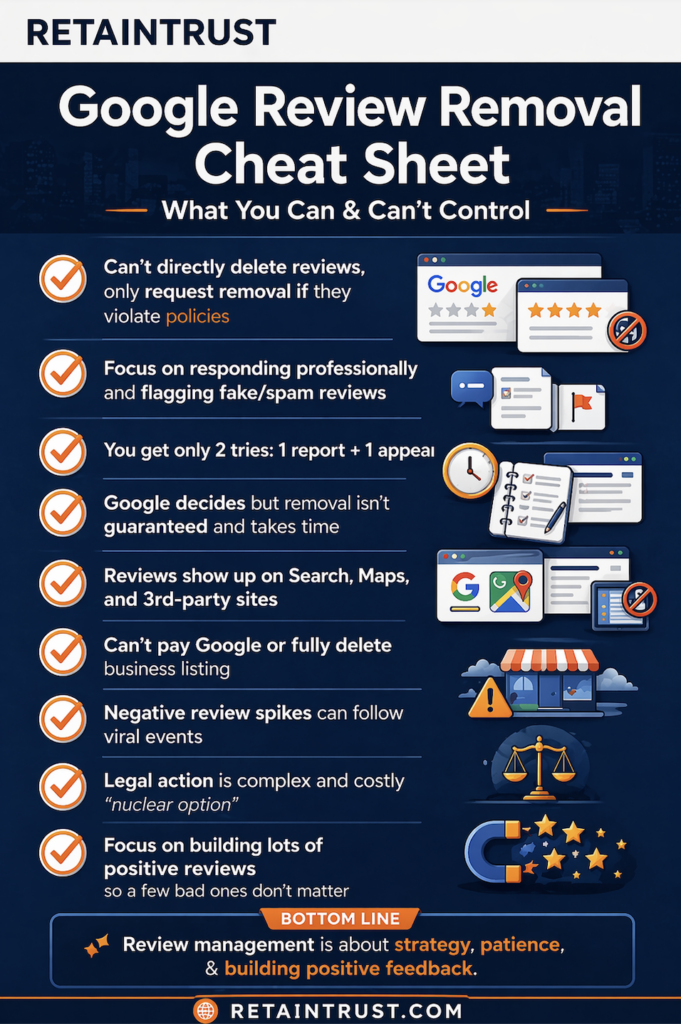
You have multiple options
- Resolve the issue offline by contacting the customer directly and offering a solution.
- Respond to the review publicly with a clear explanation and resolution.
- Flag and appeal the review if it violates Google review policies.
- Contact Google support if you’re facing a spike in fake reviews, spam attacks, or a viral incident.
How to Report & Remove Negative Google Reviews
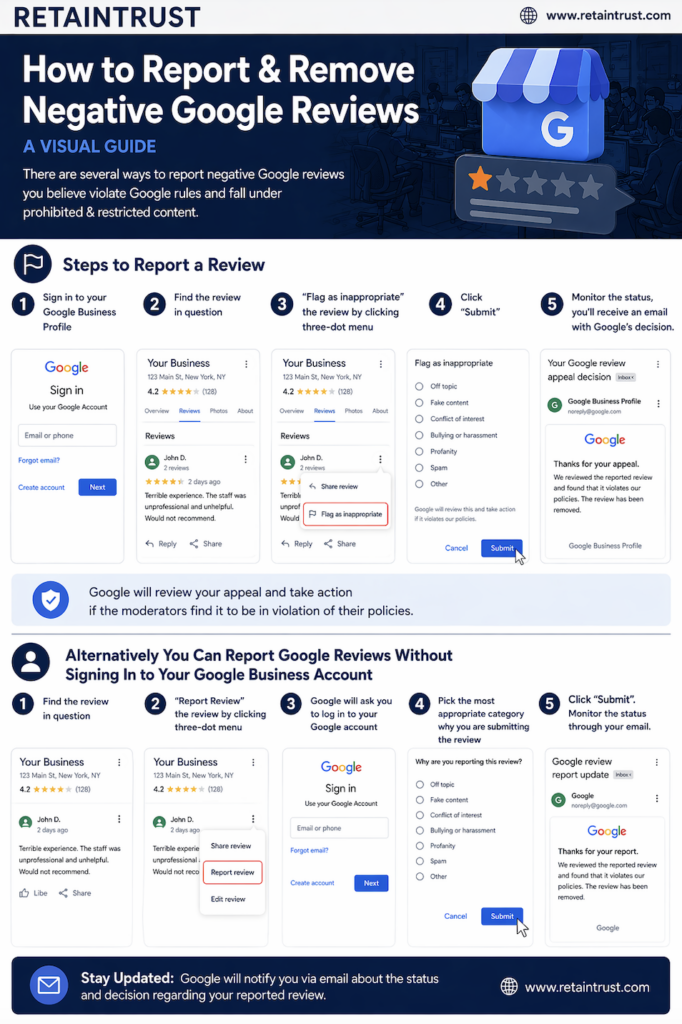
There are several ways to report negative Google reviews you believe violate Google rules and fall under prohibited & restricted content.
Steps to Report a Review
- Sign in to Google Business Profile
- Find the review in question
- “Flag as inappropriate” the review by clicking three-dot menu
- Click “submit”
- Monitor the status, you might receive the email from Google with their decision.
Google will review your appeal and take action if the moderators find it to be in violation of their policies.
Alternatively You Can Report Google Reviews Without Signing In to Your Google Business Account
- Find the review in question
- “Report Review” the review by clicking three-dot menu
- Google will ask you to log in to your regular Google or Gmail account
- Pick the most appropriate category why you are submitting the review
- Click “submit”
- Monitor the status through your email
Visual Guide to Reporting and Removing Negative Google Reviews
Google Support Page for Review Removal:
- Go to page: https://support.google.com/business/answer/4596773
- Click the button “Request Review Removal”
- Confirm your email / account
- Choose your business from Google Business Profile page
- Select review from the list
- Write why you believe the review violate Google’s Guidelines
- Click “Submit”
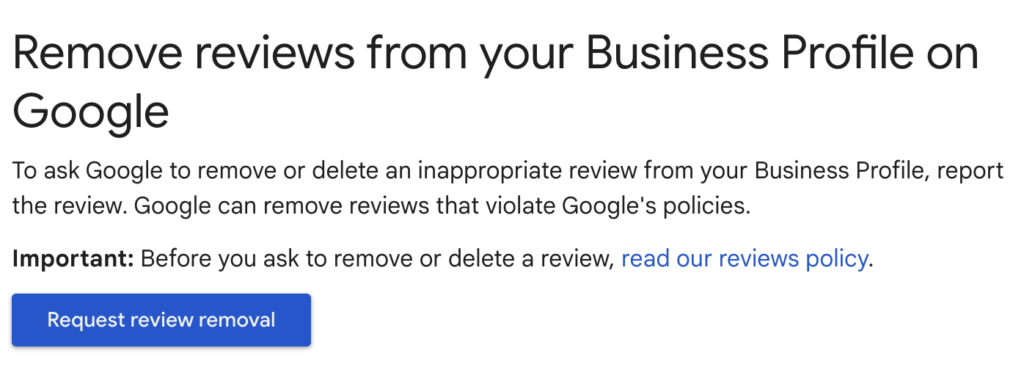
Following these steps ensures that you report negative Google reviews that violate Google’s guidelines and increasing the chances of their successful removal.
Why Google Removed the Explanation Field When Reporting Reviews?
You might notice there is no more field where you can write your explanation. Google has gradually simplified the review reporting process in Google Business Profile and Google Maps, removing the option to add a written explanation during the initial report. Instead of submitting detailed comments upfront, users now only select a violation category such as spam or harassment. This change, introduced around 2023–2024, shows Google’s shift toward a more automated moderation.

How to Appeal Google Review Decisions and What to Expect
To appeal a rejected review removal request in Google Business Profile, you need to use the Reviews Management Tool inside your account. After submitting a report and receiving a decision, locate the flagged review in your dashboard and select the option to appeal. In most cases, Google allows one formal appeal per review, and this process typically does not include a field to provide a detailed explanation. Because of this, success depends heavily on selecting the most accurate violation category during the initial report and ensuring the review clearly violates Google’s policies.
If the appeal is denied, there is usually no second standard appeal option available within the system. But in some cases, businesses may escalate the issue by contacting Google Business Profile support or posting in the official community forum, where Product Experts can sometimes review the situation. While outcomes are not guaranteed, escalation is often the only remaining path once the formal appeal has been used.
Google Review Removal Attempts Are Now Limited With Only Two Chances to Get It Right
Having only two removal attempts makes a huge shift from the past, when business owners could flag negative reviews repeatedly. I know someone who even succeeded after 20+ tries. Google now allows just one removal request and one appeal. After that, the review stays and can’t be flagged again.
This makes accuracy critical. You need to choose the most appropriate violation category from the start. If you don’t, you risk wasting both attempts and running out of options.
Types of Google Reviews You Can Flag and Report
Google allows you to report reviews that violate its policies, which include:
- Spam and Fake. Reviews that are not genuine.
- Conflict of Interest, when someone is affiliated with business.
- Offensive Content and Profanity. Reviews that contain offensive language, threats, violence, or/and hate speech.
- Illegal Content. Those reviews that contain illegal content or references.
- Off-Topic reviews that have nothing to do with business.
- Buying, Harassment, or Identifiable Information. Review personally attacks specific individual.
- Personal Information such as address, phone, email.
How Long Does it Take for Google to Remove a Review?
Once you submit a review, often it takes about 2-3 business days for Google moderators to review and make a decision if the review in question violates it’s rules and should be taken down. You will receive an email with final decision. However, we’ve seen when the reviews were taken down in less than 24 hours, or waited for over a week to get a response.
However, as of 2025 and 2026 many users reported that some review removal requests can sit for weeks and then Google review them all at once. Google has acknowledged that high volumes of review appeals are causing delays, with no clear timeframe for resolution.
Success Rate of Removing Flagged Google Reviews
Google doesn’t disclose the success rate for removing flagged reviews. The likelihood of removing an unfair Google review depends on things like the specific reasons for the appeal, how the review violates Google’s policies, and the evidence provided by the person who flagged review in question. Reviews that obviously break the rules are more likely to be taken down, but still no guarantee. Sometimes it takes several attempts to successfully flag and take down the review. While services that assist with review removal may promise different success rates, none can guarantee 100% removal. Be cautious of anyone claiming otherwise, they may be trying to scam you.
How to Handle Star-Only Google Reviews Without Written Feedback
Often people give you only star rating without writing an actual review. In this case you can reply to their rating with simple thank you. After that invite them to share their thoughts. Here a simple reply you can use: “Thank you for your rating, if you have any feedback we’d love to hear!”
If it is a 1-star rating with no feedback, you should monitor the pattern and see if there spammy behavior such as multiple 1-star ratings in a short time from suspicious accounts. Once you document the behavior and have enough evidence, you should report those reviews to Google for investigation.
From personal experience, it’s almost impossible to remove a review that has only stars (1 or 2 stars) and no comments. Even when trying to report it, it’s hard to choose category why this review should be flagged. Therefore, finding patterns, like large influx of reviews, can help to build a strong case when contacting Google support directly.
How to Deal With Google Reviews That Come After Viral Events
Many businesses have faced negative reviews and harassment following viral events, such as videos or taking a stand on sensitive issues. Even a conflict with a celebrity or famous influencer can trigger negative reviews, like it happened with Dragon Pizza in Somerville Massachusetts after the video where the owner argued with David Portnoy from Barstool Sports. Online trolls publish negative reviews trying to tarnish reputation and affect customer’s perception, often it has nothing do do with products and services business has to offer.
To contact Google about negative reviews after a viral event, go to your Google Business Profile, open the Reviews Management Tool, and click Report on any reviews that break Google’s policies. If the problem continues, reach out to Google’s Small Business Support for help with getting the reviews removed. Normally it takes a few days, but Google removes those reviews, clean profile, and even temporary blocks new reviews from being posted.
Reporting Inappropriate Images and Videos in Google Reviews
Users can attach photos and videos to their reviews, and sometimes that content is inappropriate or completely unrelated. The good news, you can report the media separately from the review itself.
Here’s How to Report Images and Videos in Google Reviews
- Open the image or video in the review
- Click the flag icon in the top-right corner
- In the “Report Content” section and choose the most relevant reason
- Click “submit” button
From my experience, media removals can take more time, sometimes over a month. If nothing happens, it’s worth submitting another report after a couple of weeks. Sometimes it takes multiple attempts to finally remove inappropriate media.
Why Policy-Violating Reviews Sometimes Get Approved by Google?
Google use both, manual or automated, systems to check review submissions. However, with millions of new reviews every day, many questionable reviews can slip through. Google definitely rely on business owners and community to report questionable content. This is why it’s important for businesses to regularly monitor their Google Business Profile account and flag any questionable ones.
Example of Inappropriate Review on Google
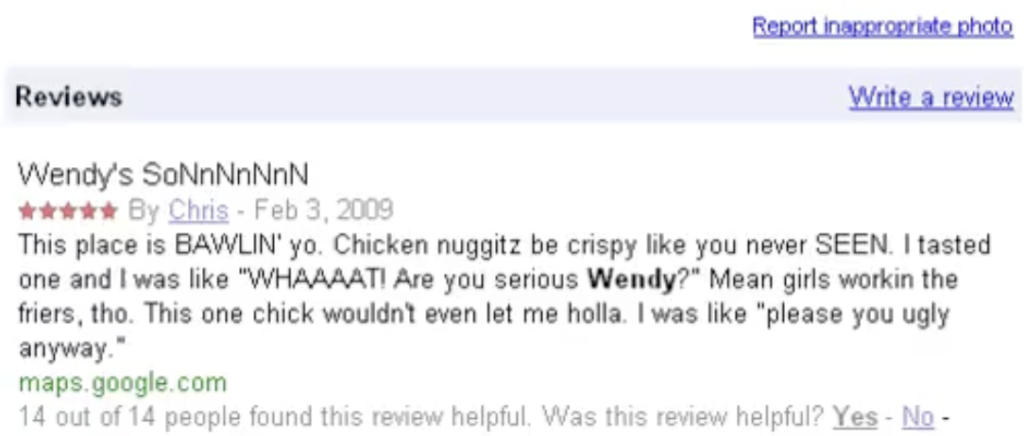
The inappropriate review for Wendy’s store in Massachusetts is from a long time ago, but it stayed on Google for years and even became viral at some point.
Google Reviews Cross-Platform Reach
Google reviews show up in a lot of places like Google Maps, search results, partners and across different devices. Because of that, removing a review from Google can also make it disappear from other places where it appears.
- Google Search Results, the reviews and star rankings appear as snippet in the search results when people search for products, services, or business names.
- Google search results for local queries (Local Pack), when people use geographic locations like states, regions, cities, towns, zip codes, neighborhoods, etc.
- Google Maps, the business listings with reviews appear on the maps.
- Google My Business, online portal where business owners can manage their online visibility and reviews from the customers.
- Google Maps Applications on Mobile Devices and GPS, business profiles as well as reviews can be seen when people use cell phone and GPS devices for research and navigation purposes.
- Google Gemini AI assistant. Reviews appear when people search for advice using Google’s AI platform.
- GenAI platforms like ChatGPT, DeepSeek, and others
- Other Google Services, the reviews may appear in Google Ads when the advertiser activate the feature, or Google Shopping results.
- Third-Party Websites and Directories, many networks and services aggregate business information and customer reviews, including Yelp, TripAdvisor, Facebook, and niche industry specific directories.
Google Reviews on AI Platforms
When AI platforms learn about companies, businesses, or services, they analyze reviews on Google and even cite them when people search for information. Having many reviews on Google helps AI platforms find and recommend your product, making your Google reputation key part of generative engine optimization (GEO). For example, ChatGPT displays reviews in its results and even provides links to Google listings on the maps.

What to Do If a Google Review Can’t Be Removed?
Not every review can be successfully removed from Google. Some of them are well written, don’t violate any rules, and describe real experience with business. Still, business owners can take several steps to address those reviews.
- Try to Resolve Offline
When it’s possible, contact a client or customer who left negative feedback on Google and see if there anything you can do to resolve the issue. Sometimes the person might have change of heart and take down or rewrite review to something positive. - Respond to the Review
Publicly respond to the review in a professional manner. This shows potential customers and clients that you care about feedback. - Encourage Positive Reviews
Encourage happy customers to leave positive reviews. This can balance out the negative reviews and improve your overall rating on Google and other networks. - Leverage Other Review Networks
Other business review networks like Yelp, Glassdoor, BBB and others appear in Google search with the star ratings highlighted. It can help to show the overall positivity in the search results when people are searching for your business name.
Can I Pay or Sponsor Google To Remove Bad Reviews?
No, Google doesn’t hide, bury, or remove reviews even for businesses that advertise with them through services like Google Ads .
Can I Completely Remove My Business Listing from Google Maps?
No, you can’t delete a business from Google Maps completely. Your best option is to mark it as “Permanently Closed.” Google will maintain this status but won’t completely delete the listing if the business was real. All previous ratings and customer reviews will stay visible for years after it was closed.
Mistakes to Avoid When Handling Negative Google Reviews
Top Mistakes to Avoid While Managing Your Google Business Reviews:
- Asking customers and clients not to write reviews, we live in free speech society. Plus it can backfire.
- Confronting negative reviews, trying to explain yourself, it only escalates and makes it worst.
- Don’t be too defensive when writing replies to bad reviews, it makes things worse.
- Don’t make legal threats against people who wrote reviews, or against Google itself, it’s counterproductive.
- Posting positive reviews for your own business, ask employees to post reviews. It is against Google policy and damages trust and credibility.
- Paying someone for positive reviews, hiring services to post reviews.
- Spamming Google by submitting too many requests to remove reviews, do one at a time and try again weeks later if the first attempt wasn’t successful.
- Creating duplicate profiles, it’s against Google’s terms and can backfire
Last Resort, Taking Legal Action
Yes, it is possible to request a review removal from Google through legal channels, but this is the most complicated and expensive route.
In most cases, Google requires a court order before they’ll remove content for legal reasons. That means you’ll need to take the issue to court, win, and then submit that documentation as part of your removal request.
This route can involve significant legal fees and time. It’s typically reserved for serious situations like defamation, false statements, or serious reputational damage. Also, your chances of success can vary depending on the laws in your country or state.
Filing a Legal Removal Request with Google
- Log in to your Google Business Profile account, go to “Report Content for Legal Reasons”
- Click “Create a request” and then select “Google Search”
- Under “Other search features” choose “Local Listings” and then select “Legal reasons to report content”
- If you have a court order, select “Court Order” (this significantly increases your chances)
- If you don’t have one, choose “Other” (approval is less likely)
In the submission form you’ll be able to explain your case, provide legal arguments, and attach documents. The more well-documented your request is, together with court order, the better your chances of success.
Negative Reviews Aren’t the End of the Story
When dealing with negative Google reviews it’s not about finding a magic “delete” button. It’s about understanding how the system works and consistent management. Absolutely, some reviews can be removed when they break the rules, but others are here to stay and that’s where strategy matters.
The businesses that come out ahead aren’t obsessing over every bad review. They’re responding well, staying consistent, and collecting enough positive feedback that one angry comment just looks like background noise.